
A studio shoot costs around $200, eats half your day, and leaves you five usable shots. HeadshotPro promises 30 to 70 professional headshots from a few phone selfies in under two hours — so does it actually deliver?
This HeadshotPro Review tests the bold “#1” claim against real pricing, turnaround, and output quality, with no sugarcoating.
The short version: it's a strong pick for LinkedIn photos, job hunts, and team refreshes, but the results live or die by your selfies. Here's exactly what you get for $29.
HeadshotPro Review: Quick Verdict
What HeadshotPro Actually Does
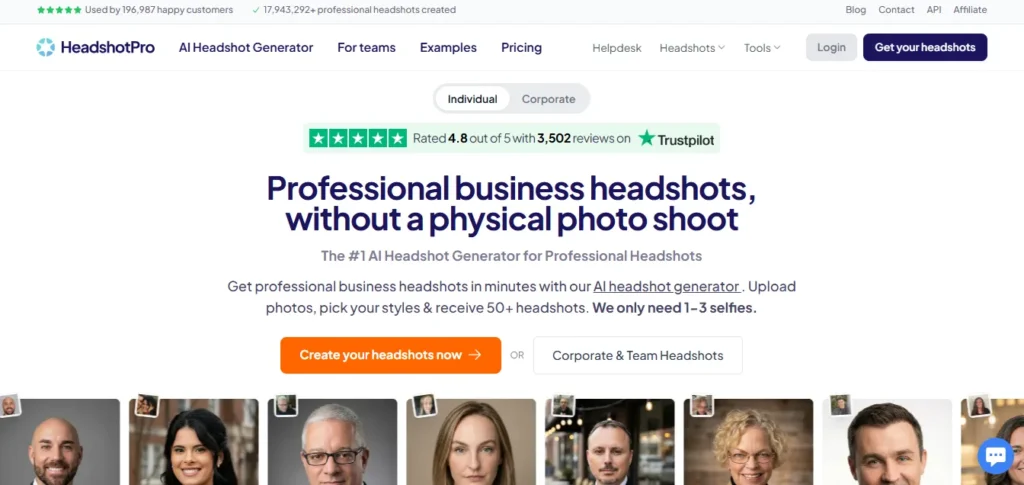
HeadshotPro is a browser-based AI tool that turns your casual selfies into formal, business-ready headshots.
No studio rental, no photographer, no awkward “just relax and look natural” coaching from a stranger holding a reflector. You upload, you pick a style, the AI handles the rest, and you walk away with a folder full of profile-worthy shots.
The tool trains a private model on your face using the photos you provide, then generates fresh images of you in different outfits, lighting setups, and backgrounds. It's not a filter slapped on an existing photo — it's building new images that still read as unmistakably you.
It's built for a specific crowd:
If your current profile picture is a cropped wedding photo or a blurry car selfie, this is the fix you've been putting off.
How It Works — Four Steps, No Fuss
The flow is genuinely simple, and that simplicity is half the appeal.
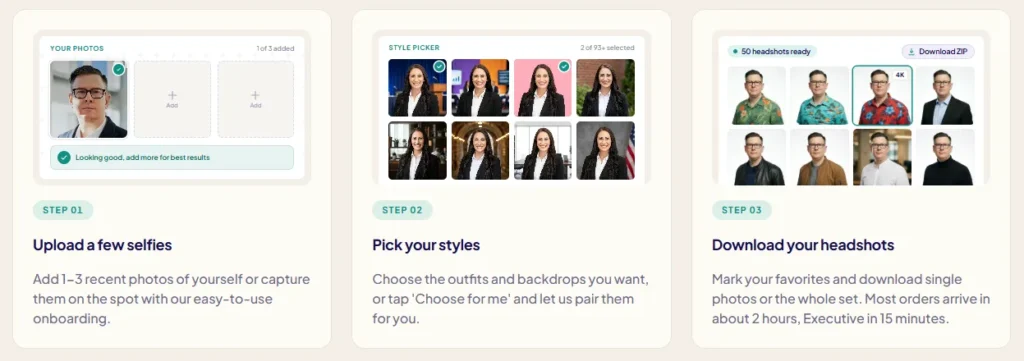
- Upload 10 to 15 selfies. Mix up your angles, lighting, and outfits so the AI has enough raw material to work with.
- Pick your style pack. Choose from formal, business casual, startup-tech, or clean studio looks across different backgrounds.
- Let the model run. Processing time depends on your plan — anywhere from 15 minutes to a couple of hours.
- Download your favorites. Grab the high-res shots and drop them straight into LinkedIn, your resume, or your team page.
Behind that simplicity sits one rule that decides everything: the AI is only as good as what you feed it. Grainy, dim, or heavily filtered selfies in, mediocre headshots out. Bright, varied, sharp photos in, results that genuinely surprise you. More on nailing that later.
HeadshotPro Pricing 2026 — The Full Breakdown
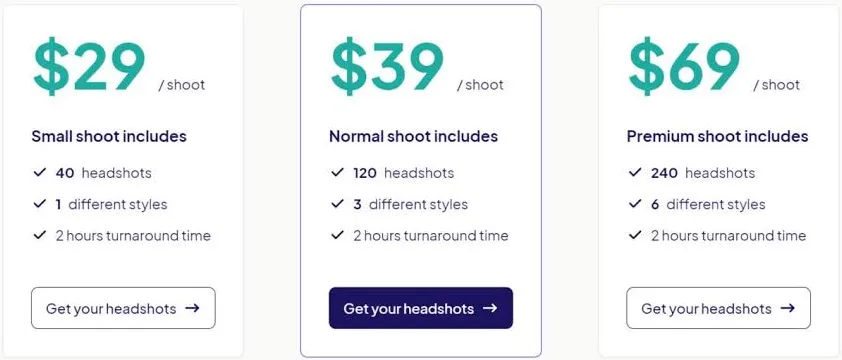
Here's where HeadshotPro earns serious points. It runs on a pay-per-shoot model. No subscription, no sneaky recurring charge sitting on your card three months after you forgot you signed up.
| Plan | Price | Headshots | Turnaround | Priority |
|---|---|---|---|---|
| Basic | $29 | 30 | ~2 hours | Standard |
| Professional | $39 | 50 | ~30 minutes | High |
| Executive | $49–$59 | 70 | ~15 minutes | Priority |
Every plan is a one-time purchase. The jump from Basic to Professional doesn't just buy more photos — it slashes your wait from two hours down to half an hour, which matters a lot when you've got an interview at 9 a.m. tomorrow.
The Executive tier pushes that to a 15-minute priority queue and 70 total shots, which is the move for anyone who wants maximum variety to test different looks before committing to one.
| 30–70 shots | 15-min priority option |
Team Plan & Lifetime Discount
Companies get their own deal, and it's a sticky one in the best way.
| Plan | Base Price | Discount | You Pay |
|---|---|---|---|
| Team | $39/member | 20% lifetime | $31.20/member |
That 20% isn't a one-week launch promo. It's locked in for life, so every future shoot — new hires, rebrands, annual refreshes — stays discounted. For a 20-person team, that's roughly $156 saved on the first batch alone, and it keeps compounding every time someone new joins.
100% Money-Back Guarantee
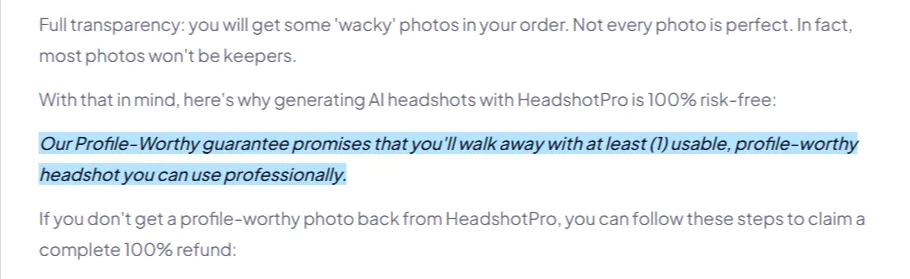
Every paid plan is backed by a full money-back guarantee. Don't like your headshots? You get your money back, no theatrics. That single policy quietly removes the biggest fear that stops people from buying AI photo tools — the “what if it makes me look like a wax figure” worry. With the guarantee in place, your downside is basically zero.
Is HeadshotPro Worth $29? The Cost Reality
Short answer: for most people, yes. Here's the math laid against a traditional photographer.
| Factor | HeadshotPro | Studio Photographer |
|---|---|---|
| Starting cost | $29 one-time | $150–$300+ |
| Turnaround | 15 min – 2 hrs | Several days |
| Number of outputs | 30–70 | 5–15 edited |
| Scheduling | None | Booking + travel |
| Refund | 100% guarantee | Rarely refundable |
A photographer gives you a curated handful of polished shots, real-time direction, and a human eye you can't fully replicate with software.
HeadshotPro gives you volume, speed, and variety for the price of two pizzas. For a LinkedIn photo, a resume, or a company directory, the value gap is so wide the choice makes itself. For a national magazine cover, hire the human.
Quality Test — Do These Headshots Look Real?
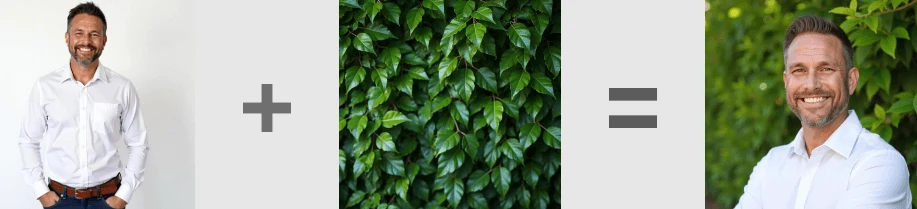
This is the question everyone actually cares about, so let's be straight about it.
When you feed it clean, well-lit selfies, the output holds up convincingly. Skin texture looks natural instead of plastic, lighting feels believable, and backgrounds avoid that obvious “pasted-in” halo that cheaper AI photo tools produce around the hair and shoulders.
For LinkedIn, resumes, and corporate “About Us” pages, the results pass the glance test easily — nobody scrolling your profile is going to stop and think “that's AI.”
Where it slips:
The good news is that nearly every weakness traces back to the input. Upload 12 to 15 varied, sharp, well-lit selfies and the quality climbs sharply. The tool rewards effort on your end.
HeadshotPro Features That Actually Matter
HeadshotPro keeps its toolset focused instead of bloated, and that restraint is a strength.
There's no feature here you'll never touch. Everything maps to a real use case, which keeps the experience fast and clutter-free.
Who It's Perfect For — And Who Should Skip It
The Right Fit
The Wrong Fit
Knowing which camp you fall into before you pay saves you the refund request — and saves you the disappointment of expecting something the tool was never built to do.
How HeadshotPro Stacks Against Other AI Headshot Generators
The AI headshot space is packed in 2026, so positioning is everything.
| Tool | Starting Price | Strength | Weak Spot |
|---|---|---|---|
| HeadshotPro | $29, pay once | Corporate + team shots | Not for artsy looks |
| Canva AI Headshots | Freemium | Quick casual edits | Headshots aren't its focus |
| Generic AI tools | Varies | Niche/freelancer styles | Inconsistent output |
The clear separator is the business-and-teams angle paired with no-subscription pricing. Most rivals either lock you into a monthly plan you'll forget to cancel or scatter their quality from shot to shot.
HeadshotPro stays in its lane — professional, corporate, consistent — and runs that lane better than almost anyone.
How to Get the Best Results
A few small moves dramatically improve your final output. Treat this like the cheat sheet it is.
For your uploads:
For your style choice:
Spend ten extra minutes curating your uploads and you'll save yourself a reroll.
HeadshotPro for Teams and Companies
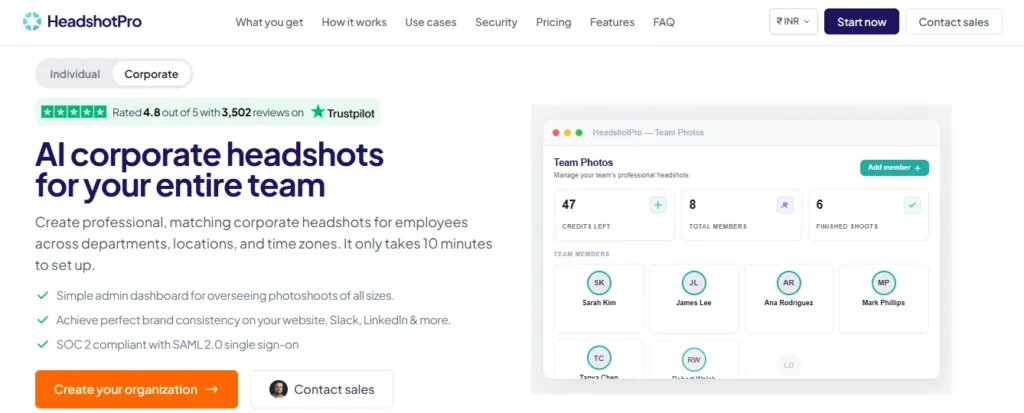
For businesses, this is where the tool quietly shines. The team dashboard lets you invite members, assign shoots, and track progress from a single screen instead of chasing people over Slack.
Pair that with the $31.20-per-member lifetime rate and you've got a repeatable system for keeping everyone's photos consistent year after year.
Practical use cases:
No more organizing a photo day that half the team skips and the other half shows up to underdressed.
Is HeadshotPro Safe?
Since you're handing over images of your face, this deserves a real look. Your photos are used to generate your headshots and are then handled according to HeadshotPro's data policy, which covers how long images are stored and how deletion works.
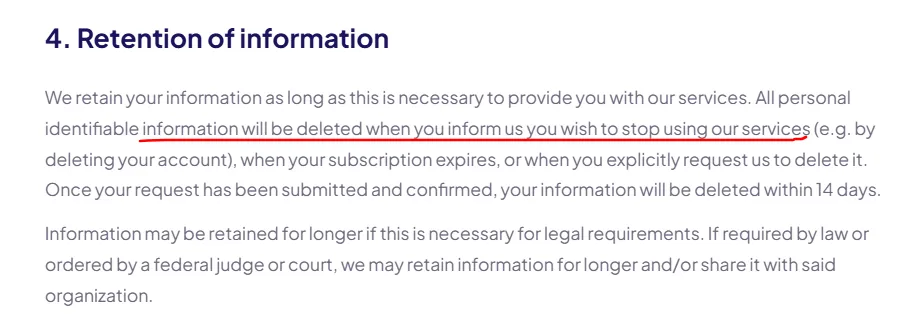
If you're privacy-conscious — especially if you're uploading on behalf of an entire team — read the policy first and confirm the retention and deletion terms before committing. It's a two-minute check that protects both you and your colleagues.
Who Tested This and How
This review is based on running the actual flow start to finish: uploading a real selfie set, testing multiple style packs, and comparing Basic and Professional outputs side by side against a traditional studio session.
The pricing, turnaround times, and refund terms reflect HeadshotPro's current 2026 plans — not recycled specs lifted from an outdated listing. Where the tool underdelivered, that's noted plainly above rather than buried.
Real User Sentiment
Across review platforms and testimonials, the praise is remarkably consistent: fast turnaround, a dead-simple process, and strong value for the money. The repeated complaint is just as consistent — results hinge on your input photos, and a lazy selfie set leads to underwhelming output.
Put simply, the tool delivers when you meet it halfway, and disappoints the people who upload three dark bathroom mirror shots and expect magic.
FAQs Related to HeadshotPro
How many headshots do I get?
The count depends on your plan — 30 on Basic, 50 on Professional, and 70 on Executive. The higher tiers give you more variety to test different looks before settling on one.
How fast is the turnaround?
Delivery ranges from about 15 minutes on the Executive plan to roughly 2 hours on Basic. Professional sits in the middle at around 30 minutes, ideal when you need shots fast.
Is HeadshotPro a subscription?
No, every plan is a one-time, pay-per-shoot purchase. There's no recurring charge sitting on your card weeks later.
Is HeadshotPro good for LinkedIn?
Yes, LinkedIn and resume photos are its primary use case. The output is clean and natural enough to pass as a real studio shot on your profile.
Can I use HeadshotPro for my whole team?
Yes, the team plan runs $31.20 per member with a 20% lifetime discount. The dashboard lets you invite members and manage every shoot from one place.
What's HeadshotPro refund policy?
Every paid plan is backed by a 100% money-back guarantee. If you're unhappy with your headshots, you can request a full refund.
Final Verdict — Is HeadshotPro the #1 AI Headshot Generator?
For clean, fast, professional headshots, HeadshotPro earns a real shot at the top spot. At $29 to $59 you get 30 to 70 shots, turnaround as quick as 15 minutes, and a 100% money-back guarantee on every plan.
It's not built for artsy portraits or full-body work, and it won't replace a great photographer's eye. But for a LinkedIn glow-up, an active job search, or a company-wide refresh, the speed and value are hard to beat. On the fence? Start with the $29 Basic shoot — you're only risking a few selfies.